
AI tools by job
Writing, image, code, video — separate categories beat one bloated “best AI tools” dump. Mark AI products with the built-in AI badge.
- Best AI writing tools
- Top AI image generators
- Best AI coding assistants
- AI tools for marketers
People search best AI writing tools, Notion alternatives, top SEO software — they want a clear ranking, not another 4,000-word essay. Toplist Script is self-hosted PHP software for publishing those lists as lasting category pages: editorial sort order, thumbnails, optional review pages, affiliate Visit links, and outbound click analytics on hosting you control.
Buy Toplist ScriptYour tools directory homepage — category blocks for each tool niche.
Light or dark theme. Drag blocks in the layout editor; each opens a ranked tools list.


One category URL. Tools in the order you set. Logos, one-line summaries, and Visit buttons — ready for affiliate tracking URLs when you have them.


A single “50 best tools” article ages poorly and fights itself for keywords. A directory splits intent into maintainable list pages you update in admin — reorder, replace links, expand reviews — without rewriting the whole site.
| Need | Ranked tools directory | Long blog roundup |
|---|---|---|
| URL per tool niche | Category per intent | Usually one URL |
| Change #1 without rewriting | Sort order in admin | Edit the whole post |
| Per-tool review pages | Optional /{id}/{slug} | Separate posts or none |
| Affiliate Visit override | Per entry | Manual links in HTML |
| Outbound click counts | Built-in analytics | Needs extra tools |
| Homepage of tool niches | Layout editor grid | Blog index only |
Toplist Script does not invent popularity scores. You research tools, write honest blurbs, and set sort order. That is what comparison buyers and affiliate networks expect from a real directory — not a scraped dump.
Everything you need for a credible tools directory row — and a deeper review when the product deserves it. Fields map to what ships in Toplist Script today.
| Field | What you publish |
|---|---|
| Listing | Name, category, website URL, short description, sort order |
| Thumbnail | Auto screenshot, file upload, or external image URL — one card image per tool |
| Affiliate link | Optional tracking URL — when set, Visit uses it instead of the plain website URL |
| Review page | Rich HTML review, rating 0–5 (half steps), pros and cons — URL pattern /{id}/{slug}/ |
| Badges | Published, New, Featured, AI, and other flags for context on the list |
| SEO | Per-entry meta title and description; optional nofollow on outbound Visit links |
Lean PHP front-end, categories that grow sideways as you add niches, and outbound analytics so you see which tools earn attention.
Drag category blocks on the homepage. Add tools as entries, set sort order, paste affiliate URLs. New niches go live without redeploying code. Visitors get a light/dark theme toggle on the front-end.
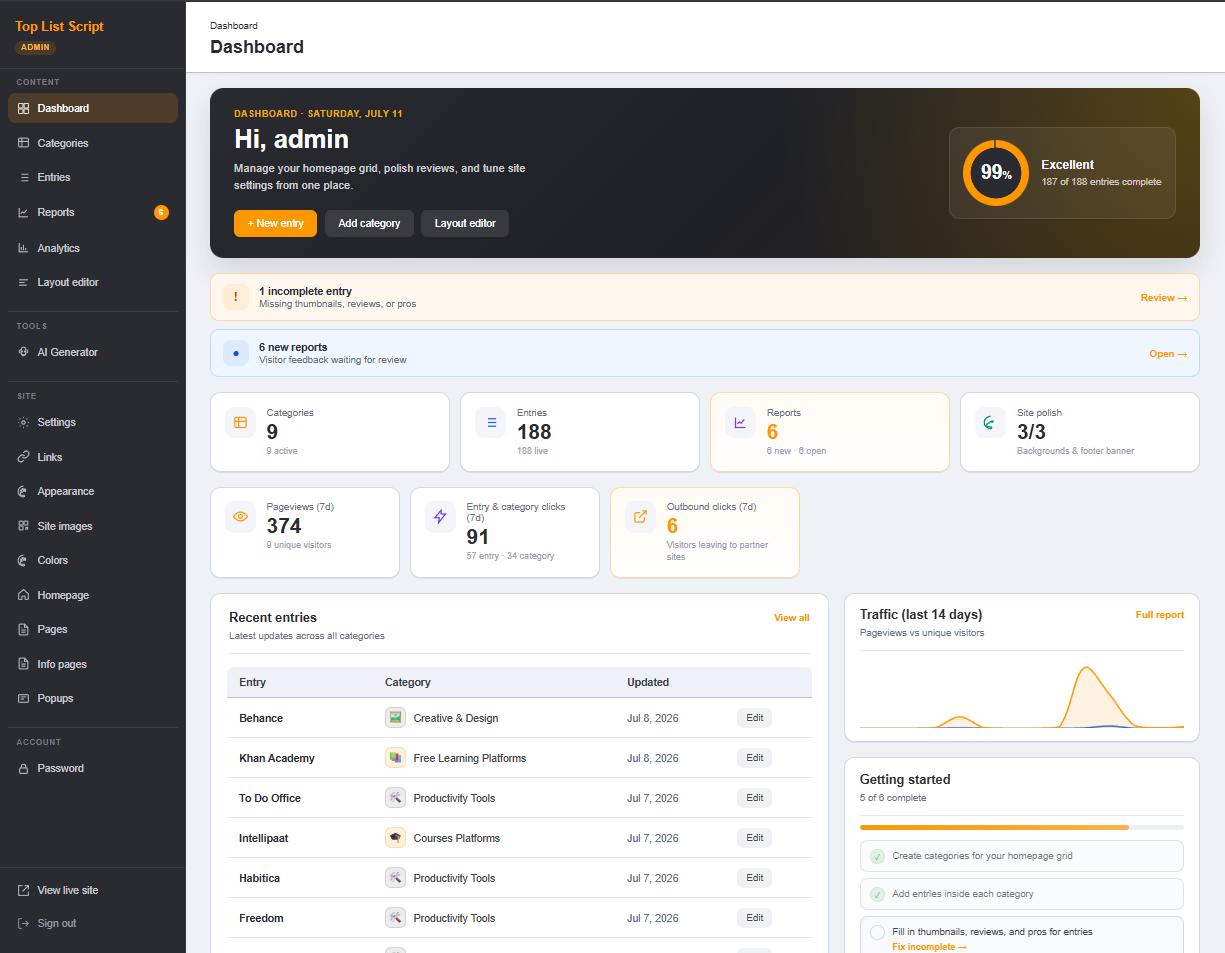
Self-hosted analytics cover pageviews and outbound Visit clicks — so you know which lists and tools deserve deeper reviews or better affiliate coverage.

Skeptical buyers want more than a one-liner. Expand any tool to its own review URL — screenshot thumbnail, star rating, pros/cons, and the same Visit CTA with your affiliate link when set.

Start with ranked shortlists. Add full reviews on tools that earn clicks or carry higher commissions — without leaving Toplist Script.
A tools directory compounds when AI writing tools link to SEO tools, and SEO tools link to analytics. Toplist Script supports structured internal linking so visitors — and crawlers — move across your niches.

Optional OpenAI API key in admin. Discover category ideas from a topic, pull candidate websites into a list, draft descriptions and review copy — then you edit rankings, screenshots, and affiliate URLs before publish. You can also add every tool by hand.
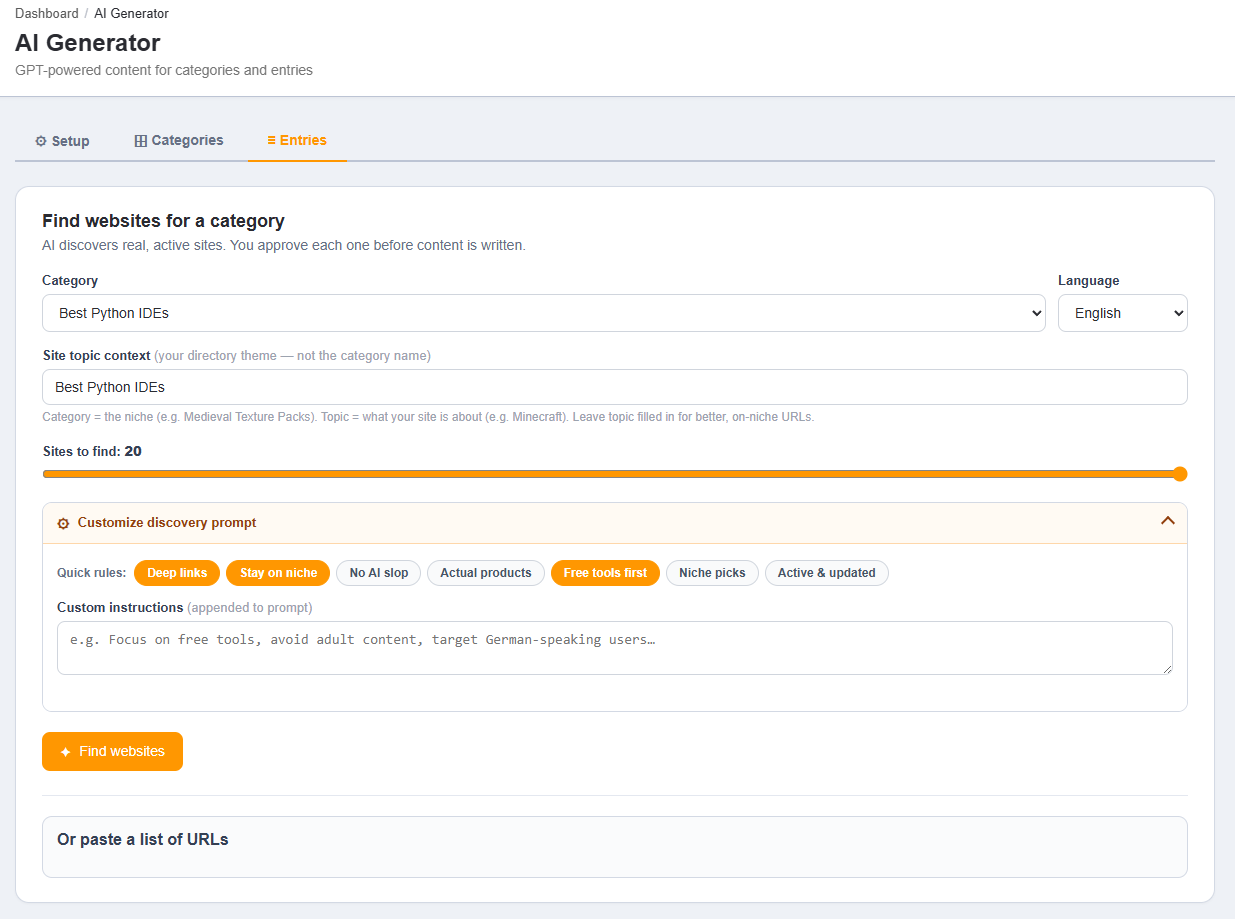
Describe your tools niche. AI suggests list titles, intros, and meta. Keep what matches real search intent.
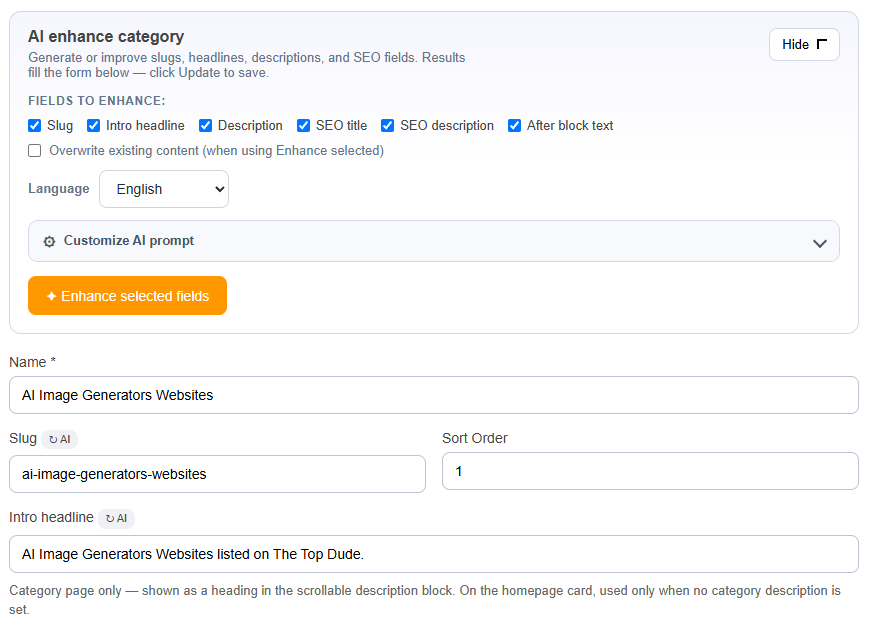
Suggest real websites for a category, enrich blurbs and reviews, accept or reject each tool, then save.
Start with one commercial niche. Add adjacent lists so internal links and authority compound. Same install as every other Toplist Script directory mode.
Writing, image, code, video — separate categories beat one bloated “best AI tools” dump. Mark AI products with the built-in AI badge.
Notion-class tools, task apps, calendars — the seed niche many operators start with. Rank by use case, not brand noise.
Keyword tools, email platforms, analytics — comparison shoppers with clear commercial intent and affiliate programs.
APIs, monitoring, hosting-adjacent tools — technical audiences who click when the ranking and review copy are specific.
Figma ecosystem, stock assets, editors — shortlists with thumbnails and Visit buttons work well for visual buyers.
WordPress, Shopify, Chrome — marketplace affiliate URLs on each entry. Split by job inside each ecosystem.
Upload Toplist Script to your server. Install checklist in the docs. One-time $299 license with full source — see terms.
| Requirement | Details |
|---|---|
| PHP | 8.1 or higher recommended (installer warns below 8.1) |
| Database | MySQL via PDO (pdo_mysql) with utf8mb4 |
| Web server | Apache with mod_rewrite, or Nginx with equivalent rewrite rules · HTTPS recommended |
| Extensions | curl and gd for AI, screenshots, favicons, and image uploads |
| Optional | OpenAI API key for AI Generator · snapshot provider for protected sites |
| License | One-time $299 · lifetime · full source for sites you operate · no resale as a competing product |
A great toplist is only half the job.
We do the SEO until you land your first affiliate sale.
Guaranteed traffic. Guaranteed results.
SEO is slow, technical, and easy to get wrong. Keyword research, on-page, backlinks and tracking eat weeks before the first click ever converts.
The tools we track and optimize with


We do your SEO until you get your first affiliate sales. No guesswork on your side.
A site of curated “best tools” list pages — each category ranks software or websites in an order you set, with short blurbs, thumbnails, and Visit buttons. With Toplist Script, you can deepen any tool into a full review page with rating, pros/cons, and an optional affiliate tracking URL.
Rankings are editorial. You set each entry’s sort order in admin (including drag-and-drop on the homepage layout editor). There is no automatic ranking by votes, traffic, or third-party APIs — you decide #1 based on research you stand behind.
Yes. Create separate categories by job (writing, image, code, video) instead of one mega-list. Entries can use the built-in AI badge. Toplist AI (OpenAI API key) can suggest categories and draft entry copy — you edit, rank, and publish.
No. You add tools manually or with optional AI suggestions. Screenshots can be captured via configured snapshot providers; product data and rankings stay under your editorial control.
No public submission queue. You curate every listing. Visitors can report problems on entries; you fix them in admin. Featured placement is sort order plus the Featured badge if you sell spots off-site.
Name, website URL, optional affiliate link, short description, thumbnail (auto screenshot, upload, or external URL), optional review HTML, rating (0–5 in half-star steps), pros/cons, SEO meta, and badges such as New, Featured, or AI. Visit uses the affiliate URL when set, otherwise the website URL.
No. Toplist Script is self-hosted PHP with MySQL — full source, one-time license, no plugin stack. Upload to your own hosting with rewrite rules enabled.
PHP 8.1+ recommended, MySQL (PDO), Apache with mod_rewrite or equivalent Nginx rules, plus curl and GD for AI, screenshots, and image uploads. Writable upload directories during install.
A blog post is one URL that goes stale. A tools directory is many category URLs you update in admin — reorder tools, swap affiliate links, expand reviews — without rebuilding the site. Light and dark themes, homepage layout editor, and outbound click analytics are built in.
Yes. One-time $299 lifetime license for domains you own or operate, free updates when we ship them, and full PHP source. Resale or redistribution as a competing product is not permitted.
Full source code · Lifetime license · Free updates · Demo · Website directory · Affiliate directory · Review pages